Boomi vs Mulesoft Cost Comparison Guide
When you evaluate integration platforms, cost is usually the factor that decides the deal. Boomi and Mulesoft are two of the most common names on enterprise shortlists, but their pricing models are built differently and are rarely easy to compare side by side. Boomi leans toward a subscription model tied to usage and connectors, while Mulesoft has historically bundled subscription and perpetual licensing in ways that depend heavily on what you negotiate. The sticker price is only part of the story. Implementation effort, specialized skills, support tiers, and customization all push the real spend well past the license line. This guide breaks down the cost structure of each platform, compares what you actually pay for, and gives you a framework for estimating total cost of ownership without relying on vendor slides. The goal is to help you ask the right questions before you sign, not to tell you which platform to buy.
Compare the costs of Boomi and Mulesoft integration platforms to make an informed decision for your business
Introduction to Boomi and Mulesoft
Boomi, now owned by Francisco Partners after its spin out from Dell, has built its reputation on a low-code, cloud-native integration platform aimed at mid-market and enterprise buyers who want to move fast without a large specialist team.
Its platform covers application integration, data synchronization, API management, and master data management, all accessed through a single web-based designer.
- The pitch is that a smaller team can build and run integrations because the platform handles much of the plumbing.
- Mulesoft, part of Salesforce since 2018, takes a different angle.
- Its Anypoint Platform is built around API-led connectivity, where integrations are designed as reusable services rather than one-off point-to-point connections.
That approach appeals to larger organizations with complex application estates, dedicated integration teams, and a desire to treat APIs as long-lived assets. The tradeoff is that Mulesoft generally demands more engineering discipline and more specialized skills to get value.
Both platforms compete in the same enterprise integration space, but they are not aimed at the same buyer profile. Boomi targets teams that want speed and simplicity.
Mulesoft targets teams that want structure and reuse. That difference shows up in how each platform is priced, how long implementation takes, and how much internal staffing you need to keep things running.
Understanding that positioning is the first step in making a fair cost comparison, because comparing them on license price alone misses the larger picture of what each platform expects from your organization.
The buyer profile mismatch is where most cost surprises originate, and it is worth getting straight before you look at a single quote.
Pricing Models Compared
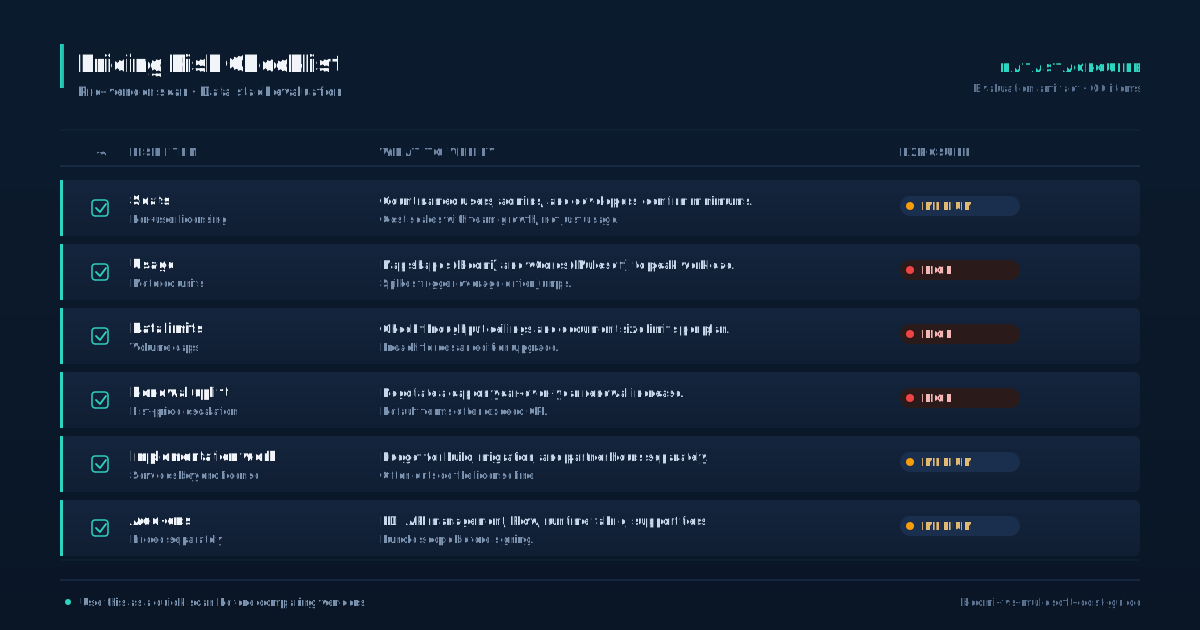
Boomi sells primarily through a subscription model organized into tiers based on the number of connections, data volume, and add-on capabilities like API management or master data management. You pay an annual subscription that covers the runtime, the designer, and a set of connectors or processes.
- As your usage grows, you move up tiers or buy additional capacity.
- There is no published public price list, which means you will negotiate based on your expected connection count, environment needs, and support level.
- Historically, Mulesoft sold perpetual licenses with maintenance fees, and over time it has moved toward subscription and term licensing, especially under Salesforce.
Mulesoft pricing is more layered. Pricing is commonly tied to runtime capacity, the number of cores or workers, and the Anypoint Platform components you license, such as API manager, runtime manager, and design center. Like Boomi, Mulesoft does not publish list prices, and deals are negotiated through account teams.
The practical difference is that Boomi tends to package more into a single subscription, while Mulesoft often itemizes components, which can make the initial quote look lower but grow quickly as you add capabilities.
Both vendors will push multi-year deals with discounts, and both will bundle professional services. The risk with Mulesoft is that you under-license early and face a steep uplift when you add runtime or API capacity later. The risk with Boomi is that you overbuy a tier because the next tier is a large jump.
In both cases, you need to model your expected connection count, data volume, and environment count before you talk to sales, or you will be pricing based on their assumptions, not yours. Build a usage model first, then negotiate.
Implementation and Maintenance Costs
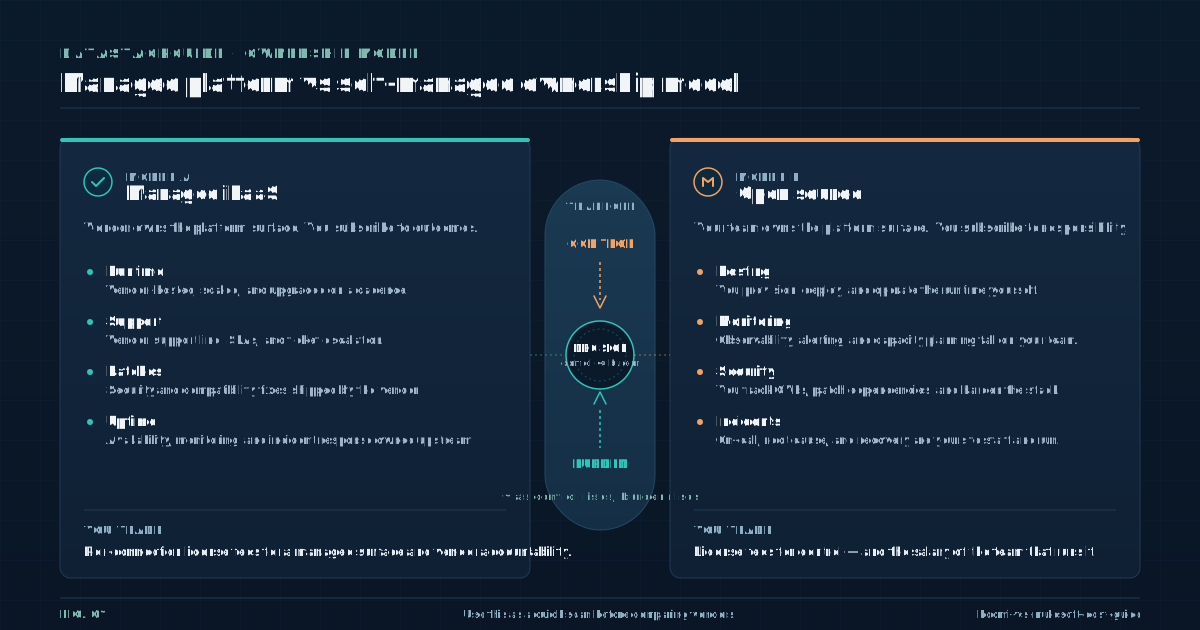
Boomi structures its platform so business analysts and junior developers can become productive within weeks. The vendor manages the runtime, deployment, and monitoring, which keeps the maintenance footprint small. Organizations often rely on fewer external consultants and experience a shorter ramp from purchase to first integration in production.
- The baseline implementation cost is lower because the platform handles more of the operational work.
- The API-led approach means you need people who can design services, build flows in Mule, and manage the Anypoint runtime.
- Certified Mulesoft developers command higher salaries than generalist integration developers, and the learning curve for Anypoint Studio and the runtime fabric is steeper.
Mulesoft requires a different investment. Many organizations bring in Mulesoft partners for the initial build, which adds cost but is often necessary to hit deadlines. On an ongoing basis, Mulesoft environments need attention to governance, deployment pipelines, and runtime scaling.
If you do not staff for that, you end up paying for premium support or external help.
Boomi can also rack up implementation cost if your integrations are complex or if you rely heavily on custom connectors, but the baseline is lower. The honest comparison focuses on how many people you need to keep the platform running over three to five years.
That staffing cost often dwarfs the subscription, and it is the line item most buyers underestimate. Model your team size and skill level before you model your license cost, because the staffing number is where the real money goes.
Features and Tools Comparison
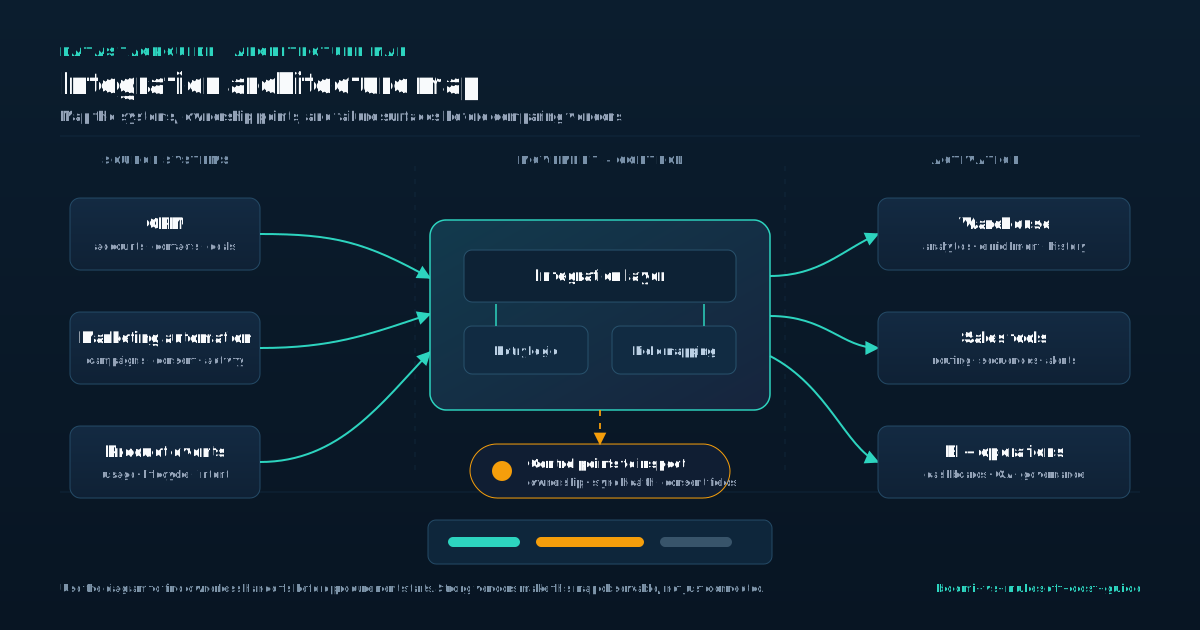
Both platforms cover the core integration needs: application integration, data transformation, API management, and monitoring. The difference is in how those features are packaged and how they affect cost. Boomi bundles most capabilities into its platform subscription, with add-ons for API management, master data management, and EDI.
- The designer is web-based, which makes collaboration and deployment straightforward, and the connector library is broad enough for most mid-market scenarios.
- Where Boomi can get expensive is when you need high-volume data processing or specialized connectors that require custom development.
- Mulesoft separates its platform into distinct products, including Anypoint Studio, API Manager, Runtime Manager, and Design Center.
Each of these can be licensed separately, which gives you flexibility but also means you need to be precise about what you buy. The connector library is strong, especially for Salesforce and other enterprise SaaS apps, and the runtime can be deployed on-premises, in the cloud, or in a hybrid model.
That flexibility matters if you have strict data residency or latency requirements, but it also means more infrastructure decisions and more cost variables.
API governance is a particular strength for Mulesoft and is often the reason larger organizations choose it. Boomi has added API management capabilities over time, but if API lifecycle governance is central to your strategy, Mulesoft still has a deeper toolset.
The cost question is not which platform has more features but which features you will actually use. Paying for a deep API catalog you never govern is wasted spend, and paying for a simple platform you outgrow in two years is also wasted spend.
Map your feature needs to your real use cases before you let either vendor scope the deal.
Total Cost of Ownership
Total cost of ownership is the number that should drive your decision, and it is the number vendors are least eager to discuss. For Boomi, the main cost lines are the annual subscription, implementation services, internal staffing, and any premium support or training.
Because the platform is cloud-native, you do not carry infrastructure cost, and upgrades are handled by the vendor.
- That keeps the operational footprint small, but it also means you are fully dependent on Boomi for runtime availability and performance.
- You have the subscription or license, implementation, internal staffing, premium support, training and certification, and potentially infrastructure if you run Mule runtimes in your own environment.
- You also need to account for the cost of the Anypoint Platform components you license over time, because adding API capacity or new environments is not always included in the initial deal.
For Mulesoft, the cost lines multiply. Training is a bigger line item for Mulesoft because the platform expects more specialized knowledge, and certification programs are part of the expected path for any team running it seriously. Support tiers differ between the two vendors, and both will try to upsell you into higher tiers.
The question to ask is what response times and coverage you actually need, not what the vendor recommends.
A realistic TCO model for either platform should cover at least three years and should include a buffer for scope creep, because integration projects almost always grow. If your TCO model only includes the license, you are not modeling the real cost, you are modeling the sales pitch.
Build the model yourself, and make the vendor defend their numbers against it.
Case Studies and Examples
Public case studies for both platforms tend to emphasize success and skip the cost details, which is exactly the problem. What you can extract from available material is the pattern of adoption, not the invoice.
Boomi case studies often describe mid-market companies replacing point-to-point integrations or legacy middleware with a platform that a small team can run.
- The recurring theme is speed of deployment and a lean staffing model, which aligns with the platform design.
- Mulesoft case studies more often describe large enterprises building API platforms, exposing reusable services across multiple business units, and treating integration as a shared capability.
- The recurring theme is governance and reuse, which aligns with the API-led approach.
The cost implication is that Boomi deployments tend to have lower implementation spend and lower ongoing staffing, while Mulesoft deployments tend to have higher implementation spend but can deliver savings over time if reuse is actually achieved. The catch is that reuse only pays off if your organization commits to it.
If teams keep building one-off integrations, the Mulesoft model does not return the value it promises, and you are left with a high-cost platform used like a low-cost one.
When you read case studies, look for evidence of how many integrations were built, how many people were involved, and how long the program ran. If those numbers are missing, the case study is marketing, not data. Use the patterns to sanity-check your own requirements, not to justify a decision you have already made.
Ask vendor references for their actual staffing count and their implementation timeline, because those two numbers tell you more than any feature list.
Evaluating Your Business Requirements
Before you compare cost, you need to map what you are actually buying the platform to do. Start with the number of integrations you expect to build in the first year and in year three. Count the source and target systems, and note which ones require custom connectors.
- Estimate data volume per integration, including peak loads, because both platforms price based on capacity at some level.
- List the environments you need, such as dev, test, and production, because environment count affects licensing for both vendors.
- Do you have developers who can learn Mulesoft, or do you need a platform a generalist can drive?
Next, assess your team. That single question often decides the comparison more than any feature list. Then look at your API strategy. If you are building a catalog of governed APIs consumed across the company, Mulesoft is built for that model.
If you are connecting applications to keep data in sync, Boomi is often the faster path. Consider data residency and runtime control. If you need on-premises runtimes for regulatory or latency reasons, Mulesoft gives you more options, but that flexibility costs money. Finally, project your growth.
A platform that fits today may not fit in three years, and switching integration platforms is expensive. Write down your requirements before you talk to either vendor, and use that document to drive the pricing conversation. If you let the vendor define your requirements, you will get a quote built around their targets, not yours.
The requirements document is your use in the negotiation, and without it you are negotiating blind.
Decision Framework and Next Steps
The decision between Boomi and Mulesoft on cost comes down to what you are buying and who is running it. Boomi tends to win when the priority is speed, a small team, and a subscription model that bundles most of what you need without a long implementation cycle.
- Mulesoft tends to win when the priority is API governance, reuse across a large organization, and a runtime model that can span cloud and on-premises.
- Neither platform is cheap, and neither is universally the right choice.
- The next step is to build a requirements document that covers integration count, data volume, environment count, team skills, and growth expectations.
Take that document to both vendors and ask for a three-year pricing scenario, not a one-year quote. Ask what is included and what is extra, and get the answers in writing. Request references from companies of your size and industry, and ask those references about implementation cost, staffing, and surprises.
If you have the internal capability, run a short proof of concept on both platforms with a representative integration, and measure build time and effort.
If you do not have that capability, bring in an independent advisor who does not sell either platform. The goal is to get past the vendor narrative and see what the platform will actually cost you to run.
Treat the pricing conversation as a negotiation, not a discovery process, and hold both vendors to the same requirements document. That is the only way to make a fair comparison and avoid a costly mismatch between what you bought and what you needed.
Sources
Frequently Asked Questions
What is the typical cost of implementing Boomi?
Boomi implementation cost includes the annual subscription, professional services if you use them, internal staffing, and any premium support or training.
There is no public list price, so the final number depends on your connection count, data volume, and environment needs. Expect a lower implementation footprint than Mulesoft because the platform is built for smaller teams.
How does Mulesoft's pricing model work?
Mulesoft pricing combines subscription and term licensing tied to runtime capacity, API management, and the Anypoint Platform components you license. You negotiate with the account team based on cores or workers, environments, and add-ons.
The initial quote can look lower than the real cost because components are itemized, so model your expected usage before you sign.
Can I customize Boomi or Mulesoft to meet my specific business needs?
Yes, both platforms support customization through custom connectors, transformation logic, and scripting. Boomi customizations are generally lighter and can be handled by generalist developers.
Mulesoft customizations often require specialized Mule developers and can add cost through both build effort and ongoing maintenance.
What kind of support and training are available for Boomi and Mulesoft?
Both vendors offer tiered support, online documentation, certification programs, and professional services. Mulesoft training tends to be a larger investment because the platform expects more specialized skills. Boomi training is typically shorter and aimed at a broader audience.
Ask what is included in your subscription and what costs extra.
How do I determine which platform is the best fit for my business?
Map your integration count, data volume, environment needs, team skills, and growth expectations. If you need speed and a small team, Boomi is often the better fit.
If you need API governance and reuse across a large organization, Mulesoft is usually stronger. Take the same requirements document to both vendors and compare three-year pricing, not just the first-year quote.