Boomi Open Source Alternative: A Practical Guide
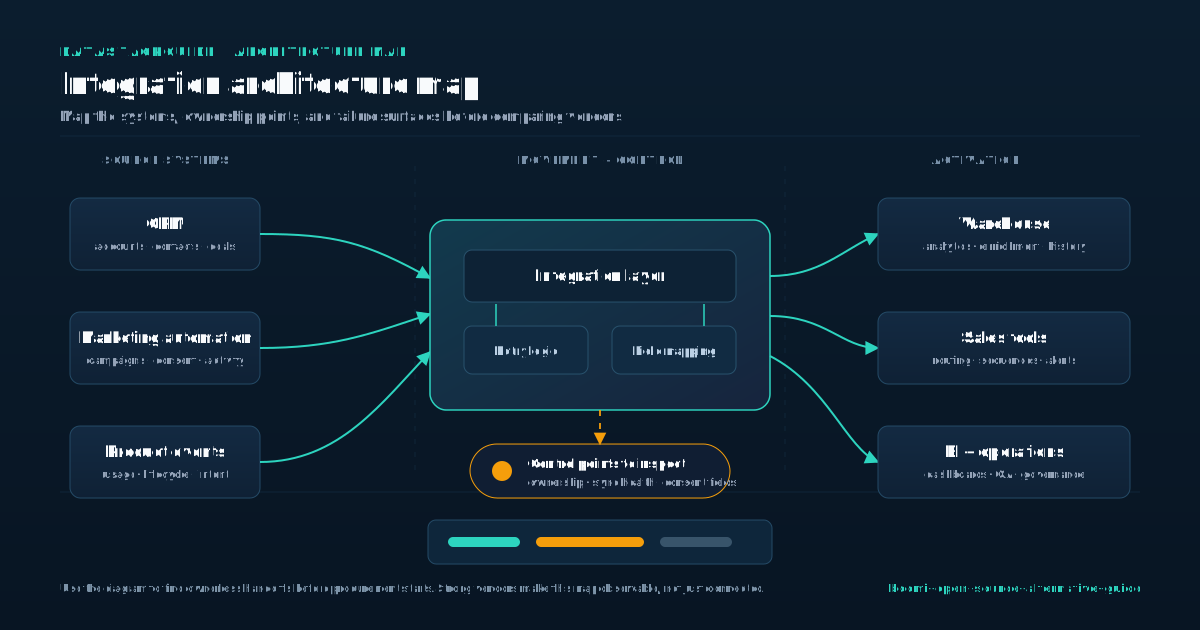
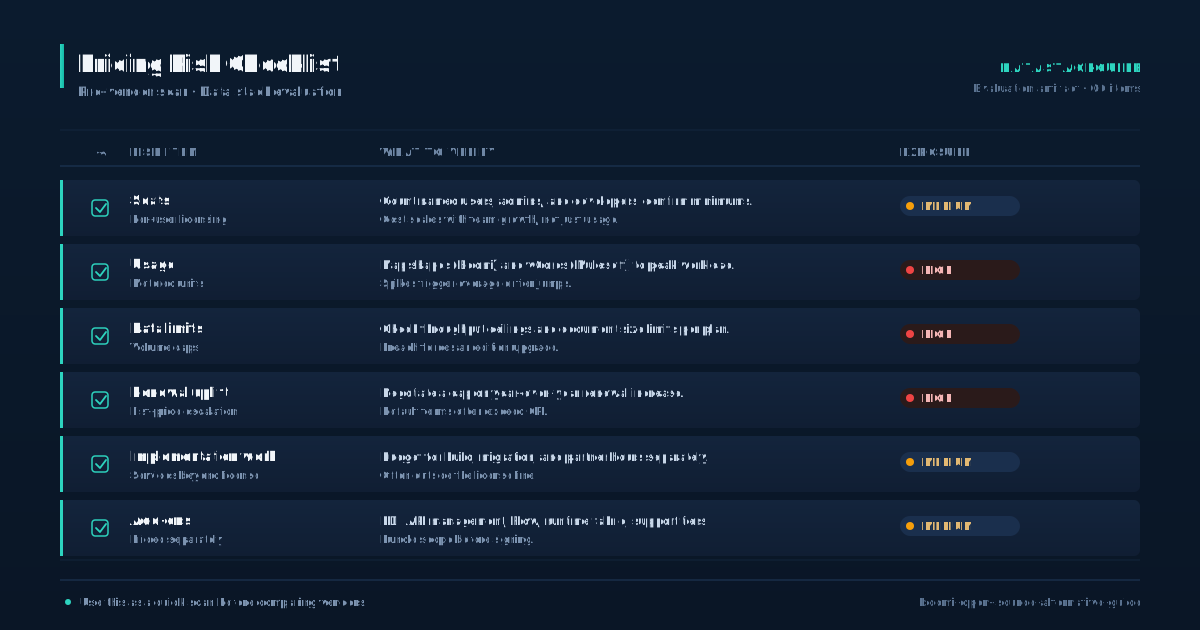
Boomi sits near the top of the integration platform as a service market, and for good reason. It handles application connectivity, data movement, and workflow automation with a managed runtime and a visual builder. The tradeoff shows up on the invoice. Pricing scales with connections, environments, and throughput, and the model pushes smaller teams and high-volume workloads toward a ceiling fast. That is where open source alternatives enter the conversation. This guide is for operators evaluating whether to move off Boomi or avoid it in the first place. We will look at three options often pitched as open source alternatives: Apache Camel, Mule, and Jitterbit. Each has a different relationship with open source, and the marketing around them tends to blur the lines. We will separate what is actually open source from what is a commercial product with a community edition, and we will be honest about the operational cost of running any of them yourself.
Compare open source alternatives to Boomi for integration and workflow automation, including Apache Camel, Mule, and Jitterbit, and learn how to choose based on your actual constraints.
Introduction to Open Source Integration Platforms
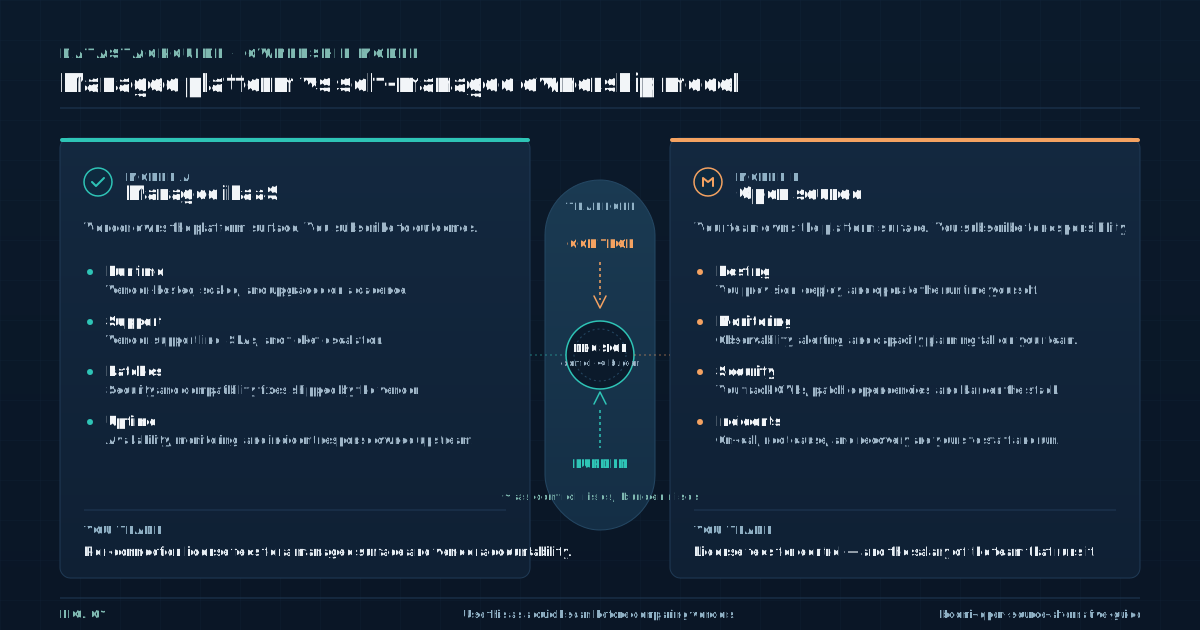
Open source integration platforms trade vendor convenience for control. You get the source code, you can modify it, and you avoid per-connection licensing. What you give up is the managed runtime, the vendor support line, and the polish of a commercial product.
- For teams with the engineering capacity, that trade can work.
- For teams without it, the savings evaporate into operations overhead.
- The real cost question is license fees versus the salary of the people who will patch, monitor, scale, and debug the platform, not license fees versus free software.
Open source integration tooling tends to assume a competent platform team. If you do not have one, the math rarely works in your favor. Community support is the other variable. A project with an active contributor base and recent commits is a different animal than a project maintained by one vendor employee on the side.
Before committing, check the commit history, the issue tracker, and the release cadence. A project that has not shipped in a year is a liability, not an asset. Security is on you. The community may patch vulnerabilities, but you have to apply the patches, validate them, and redeploy.
There is no vendor pushing an update to your tenant. For regulated environments, that means building a process around it. The honest framing: open source integration platforms are not free Boomi. They are infrastructure you own and operate.
Whether that is a good deal depends entirely on the team you have.
Apache Camel: A Popular Open Source Integration Platform
Apache Camel is the closest thing in this list to a true open source integration framework. It is Apache licensed, vendor neutral, and has been around long enough to accumulate a large contributor base and a deep library of connectors.
The core idea is routing and mediation: you define routes that move messages between endpoints, apply transformations along the way, and wire in error handling.
- There is no managed Boomi-style console out of the box.
- You embed it in a Java application or run it on a runtime like Spring Boot or Quarkus.
- That means your developers are writing code, not dragging shapes on a canvas.
Camel is a framework, not a product. For teams that prefer code over configuration UIs, that is a feature. For teams that bought Boomi specifically to avoid code, it is a nonstarter. The connector catalog is broad.
If a system has an API, there is probably a Camel component for it, and if there is not, you can write one. The documentation is dense but real, and the community answers questions on mailing lists and Stack Overflow.
Support is community by default; commercial support exists through third parties but not from a single vendor the way Boomi provides. Where Camel struggles is the operational layer.
Deployment, scaling, monitoring, and tracing are your problem. Camel works well inside Kubernetes with tools like Camel K, but you are still operating Kubernetes. For high-throughput, code-first teams, Camel is a strong fit. For teams that want a managed experience, it is the wrong starting point.
The learning curve is real, and the first month will be spent building scaffolding that Boomi gives you out of the box.
Mule: A Lightweight and Flexible Open Source Integration Platform
Mule deserves a skeptical read because the open source story is complicated. MuleSoft, now owned by Salesforce, offers the Mule runtime with a Community Edition that is open source under a CPAL license. The product most people actually want, Anypoint Studio and the Anypoint Platform, is commercial.
- The community edition has been on a slow fade for years, and the bulk of MuleSoft's investment goes into the paid platform.
- If you are evaluating Mule as a Boomi alternative specifically because it is open source, check what you are actually getting.
- The community edition gives you a runtime and a set of connectors, but the visual design tooling and the management console are part of the commercial offering.
You can build integrations in XML or Java, deploy them to the runtime, and run them yourself. What you do not get is the polished designer and the API management layer that MuleSoft sells. Architecturally, Mule is event-driven and supports a wide range of protocols and data formats.
The runtime is reasonably lightweight, and the connector model is familiar to anyone who has worked with integration platforms.
The learning curve is moderate for developers, steeper for operators who now own deployment and monitoring. The honest read: Mule as open source is a partial alternative to Boomi. It covers the runtime side but not the managed experience.
If your goal is to reduce vendor dependence and you have the team to run Mule yourself, it can work.
If your goal is a cheaper Boomi with the same convenience, Mule community edition will disappoint you. The gap between what the community edition provides and what the commercial platform delivers is wide, and it is growing wider as MuleSoft focuses its investment upstream of the open source release.
Jitterbit: A User-Friendly Open Source Integration Platform
Jitterbit is the weakest fit for the open source label in this list, and we should be direct about that. Jitterbit is a commercial integration platform with a hosted designer and a managed runtime.
There was a community edition years ago, but the product as it exists today is sold as a commercial iPaaS, competing directly with Boomi on roughly the same model.
- Calling it an open source alternative is generous.
- Jitterbit is worth a look if your actual goal is lower cost than Boomi rather than open source specifically.
- The designer is drag-and-drop, the connector library covers the common SaaS and on-premises systems, and the deployment model is hosted.
If your team is not prepared to run Apache Camel in production, Jitterbit is the kind of product you end up evaluating instead. Where Jitterbit differs from Boomi is in pricing structure and target buyer.
Jitterbit tends to price per endpoint and per organization rather than per connection, which can work out cheaper for teams with many small integrations. The tradeoff is a smaller connector catalog than Boomi and a smaller partner ecosystem.
You will write more custom scripts for the long tail of systems Boomi supports out of the box. If open source is a hard requirement, skip Jitterbit. If open source is a proxy for cost control, Jitterbit is a reasonable commercial comparison point.
Just do not expect source availability or a community you can contribute to.
It is a vendor product, and you should evaluate it as one. The contract terms, the support model, and the roadmap are all controlled by Jitterbit. The only difference from Boomi is the name on the invoice and the pricing structure. Treat it that way.
Comparison of Open Source Integration Platforms
Apache Camel, Mule, and Jitterbit occupy different positions on the open source spectrum, and the differences matter more than the marketing suggests. Apache Camel is the only option here that is genuinely open source, vendor neutral, and built for teams that want to own the code.
- The Apache Software Foundation governs the project, the license is permissive, and the contributor base is broad.
- The community edition is technically open under CPAL, but MuleSoft's investment goes into the commercial Anypoint Platform.
- The open source release is a byproduct, not a priority.
Mule sits in a gray zone. Jitterbit is not open source in any meaningful current sense. It is a commercial iPaaS that once had a community edition, and that history does not give you source access or community rights today. On operational demands, the three diverge sharply.
Jitterbit is the easiest to run because it is hosted. You configure integrations in a browser, and the vendor handles the runtime. Mule community edition requires you to deploy and operate the runtime yourself, but the integration model is familiar to anyone who has used an iPaaS. Apache Camel demands the most from your team.
You are writing Java or DSL routes, deploying them to your own infrastructure, and operating everything underneath. Scalability depends on your deployment architecture, not the platform brand. Camel scales horizontally as well as your container platform allows. Mule runtime scales with proper tuning.
Jitterbit scales within the bounds of its hosted offering. Security follows the same split: with Camel and Mule community, you own patching, network controls, and secrets management. With Jitterbit, you trust the vendor. Community support is strongest for Camel, present but uneven for Mule, and absent for Jitterbit as an open source project.
Evaluating Your Organization's Needs and Requirements
Before picking a platform, write down what you are actually trying to solve. Most teams chasing a Boomi alternative are reacting to one of three problems: cost, control, or capability. Each points to a different choice.
- If the problem is cost, the first question is whether open source will actually save money.
- Run the numbers on the team required to operate the platform: at least one engineer for deployment and monitoring, plus backup capacity for incidents.
- Compare that loaded cost to your Boomi renewal.
If the team cost exceeds the license savings, you are not saving money, you are shifting it to a different budget line. Many teams discover this too late, after they have already committed to a migration they cannot staff. If the problem is control, open source is a legitimate answer.
You avoid vendor lock-in, you can patch on your own schedule, and you can extend the platform where the vendor would not.
Apache Camel is the strongest fit here. Just be honest that control comes with responsibility. You own the bugs, the upgrades, and the security patches. If the problem is capability, meaning Boomi cannot do something you need, check whether the limitation is the platform or your configuration.
Open source will not fix a requirements gap that is really an architecture problem. It may give you more flexibility to build the missing piece yourself, but you are now maintaining that piece forever. Technical requirements matter: language stack, deployment target, observability tooling, and security posture.
Business requirements matter: support SLAs, compliance certifications, and vendor relationships.
Resource constraints matter most: how many people, with what skills, and how much time. Write all three down before evaluating a single product.
Implementing and Deploying an Open Source Integration Platform
Implementation is where open source integration platforms live or die. The pattern that works: start small, instrument heavily, and expand only after the first integration is stable in production for a real workload. Pick one integration that matters but is not on the critical path.
- Build it end to end on your chosen platform.
- Deploy it to a production-like environment with the same network controls, secrets management, and observability you will use for real.
- Run it against actual traffic for a few weeks.
This is where you discover the gaps that demos do not show: connector quirks, error handling behavior, retry semantics, and logging quality. Testing deserves more attention than teams give it. Integration failures are usually data shape mismatches, timeout behavior, and partial failure handling. Write tests for those specifically, not just happy-path messages.
For Camel, that means unit tests with the Camel test support classes. For Mule, use MUnit. For Jitterbit, use the built-in test runner and accept that you are testing inside a vendor box. Monitoring is non-negotiable.
You need metrics on message throughput, error rates, and queue depth at minimum. Distributed tracing matters once you have more than two hops. Open source platforms do not ship with a managed observability stack, so plan to wire in Prometheus, Grafana, and whatever tracing backend you already run. Troubleshooting will eat time.
Budget for it. The community forums are helpful but asynchronous. Internal runbooks for common failures are worth writing early. If you do not have someone who can debug the platform itself when it misbehaves, you will learn why managed platforms charge what they do.
Decision Framework and Next Steps
The decision framework is straightforward once you separate the three motivations. If you want true open source and you have a code-first team with platform engineering capacity, Apache Camel is the answer. It is the only option here that is genuinely open source, vendor neutral, and built to be embedded in your own stack.
- Accept that you are buying a framework, not a product, and staff accordingly.
- The engineers who will run it need Java experience, container orchestration skills, and a tolerance for reading source code when documentation falls short.
- If you want open source but need a more familiar integration model and can tolerate a fading community edition, Mule is a middle path.
Run the community edition with eyes open about its commercial neglect. Have a plan for what happens if the community edition stops receiving updates, because that day may come. MuleSoft has no obligation to keep the open source release alive, and the signals point toward further neglect.
If you want lower cost than Boomi but cannot run infrastructure yourself, Jitterbit is a commercial alternative worth comparing on price.
Do not call it open source. Evaluate it as a vendor product and negotiate hard on the contract. The pricing model may suit your workload better than Boomi's per-connection structure, but you are still buying a proprietary platform.
If none of these fit, the honest answer is that Boomi may be the right tool for your situation, and the cost is the cost of not running infrastructure.
That is a defensible position. The next step is a proof of concept on one platform, not three. Pick the option that matches your actual constraint, build one real integration, and let the experience inform the decision. Demos and feature lists will not tell you what running the platform for a year will.
A few weeks of production traffic will.
Sources
Frequently Asked Questions
What are the main advantages of using an open source integration platform?
The main advantages are lower license costs, full control over the code and deployment, and the ability to extend the platform where a vendor would not. The tradeoff is that you own the operational burden: patching, monitoring, scaling, and debugging.
How do I choose the right open source integration platform for my organization?
Start by identifying your actual constraint: cost, control, or capability. Then evaluate whether your team can run the platform in production. Apache Camel fits code-first teams that want true open source.
Mule community edition is a partial fit if you can tolerate a fading project. Skip Jitterbit if open source is a hard requirement.
What are the differences between Apache Camel, Mule, and Jitterbit?
Apache Camel is a genuinely open source framework you embed in your own Java stack. Mule has a community edition that is open source but commercially neglected by MuleSoft.
Jitterbit is effectively a commercial iPaaS with a community edition in its history, not a real open source option.
How do I implement and deploy an open source integration platform?
Pick one non-critical integration, build it end to end, deploy it to a production-like environment, and run it against real traffic for a few weeks. Wire in monitoring and tracing from day one.
Write tests for failure modes, not just happy paths. Expand only after the first integration is stable.
What kind of support and resources are available for open source integration platforms?
Apache Camel has an active community with mailing lists, Stack Overflow presence, and third-party commercial support options. Mule community edition has limited community support and is overshadowed by the commercial product.
Jitterbit offers vendor support for its commercial product but has no meaningful open source community.